Easily calculate your grades with our Grade Calculator. Track your high school or college GPA, understand your grade scale, and plan your academic success effortlessly.
Are you a student trying to keep track of your academic performance? Our Grade Calculator is here to make your life easier. Whether you are in high school or college, this tool helps you calculate your grades quickly. It works accurately no matter where you are in between.
With just a few clicks, you can see how your current scores affect your overall performance. This is especially helpful when you want to plan for future exams or improve your grades in specific subjects.
How to Use the Grade Calculator
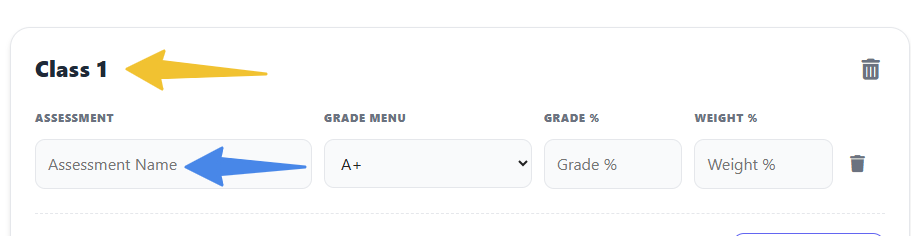
Step 1: Define Your Assessments
In the Class 1 block, start listing the different components of your grade under the Assessment column.
- Example: Type “Midterm Exam,” “Homework,” or “Final Project.”
Step 2: Enter Your Scores
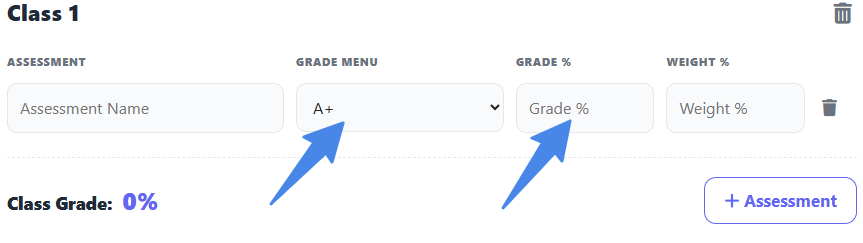
You have two ways to input your performance for each assessment:
- Grade Menu: Select a letter grade (like A or B+) from the dropdown. The calculator will assign the standard percentage for that letter.
- Grade %: If you know your exact score (e.g., 92%), type it directly into this box for better accuracy.
Step 3: Assign the Weights
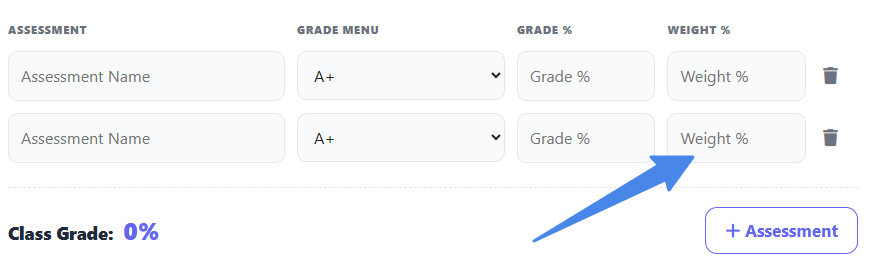
In the Weight % column, enter how much that specific assessment is worth according to your syllabus.
- Example: If your Final Exam is 30% of your grade, type 30.
- Important: Make sure all your weights add up to 100% to get a true final grade.
Step 4: View Your Class Grade
As you enter data, the Class Grade percentage at the bottom of the block will update in real-time. This shows you exactly where you stand in that specific course.
Managing Multiple Classes
If you want to track your grades for your entire schedule at once:
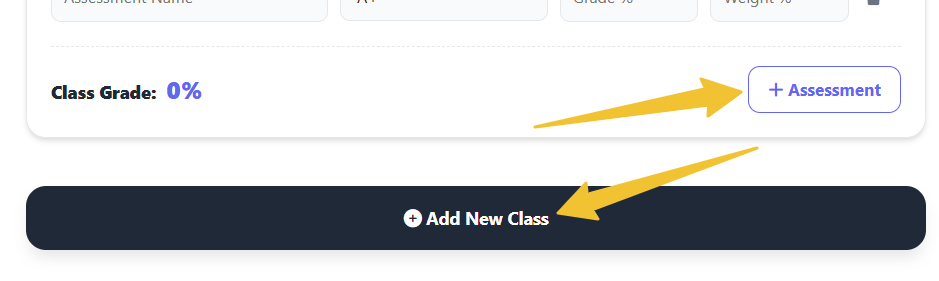
- Click the [Add New Class] button.
- A new block (Class 2) will appear.
- Repeat the steps above for each subject.
💡 Quick Tips
- “What-If” Scenarios: You can use this to see what you need on a Final Exam to keep an A. Just enter your current grades. Then type a “test” score in the Final Exam row to see how the Class Grade changes.
- Empty Rows: You don’t need to fill every row. If your class only has three major categories, just fill three rows and ensure those weights equal 100.
This tool is perfect for students who want to stay on top of their academic progress. It helps them make informed decisions about study priorities.
Benefits of Using a Grade Calculator
- Track Your Performance: Stay aware of your strengths and weaknesses in different subjects.
- Plan for Improvement: Understand which grades you need to achieve your academic goals.
- Save Time: No more manual calculations; get instant results with accuracy.
- Understand Grade Scales: Learn how different grading systems, including letter grades and percentage grades, affect your GPA.
Who Can Use It
Our Grade Calculator is suitable for:
- High school students wanting to track semester grades.
- College students calculating GPA across multiple courses.
- Anyone who wants to compare grades across different grade scales.
Tips for Students
- Always double-check your input grades to ensure accuracy.
- Use the calculator regularly to monitor trends in your performance.
- Combine this tool with other resources, like study planners, for best results.
Frequently Asked Questions
What is a Grade Calculator?A Grade Calculator is a tool that helps you quickly determine your overall grade in a class by entering your scores for assignments, quizzes, exams, or projects.
How does a Grade Calculator work?You simply input your grades and, if needed, their weight or percentage. The calculator then computes your total score automatically, so you can see your current performance.
Can I use it for high school and college courses?Yes! A Grade Calculator works for any level of study. You can adjust it based on your class requirements and grade scale.
Can I predict my final grade with this tool?Absolutely! By entering your current grades and estimating future scores, you can see how upcoming assignments will affect your final grade.
Can I calculate grades for multiple courses at once?Yes! You can enter grades for several subjects to track your overall academic performance and cumulative GPA.
Why should I use a Grade Calculator?Using a Grade Calculator helps you monitor your progress, plan your studies, and focus on assignments that can improve your grade the most.
Does it work with different grading systems?Yes! You can use it with percentage-based, letter-based, or GPA-based grading systems, depending on your school or college grade scale.
Conclusion
Our Grade Calculator is more than just a simple tool; it’s your personal academic assistant. Track your high school and college grades, understand your grade scale, and make smarter study decisions. Start calculating today and take control of your academic success!