Whether you are a middle school student encountering algebra for the first time, a college student brushing up on geometry, or a professional in fields like architecture or data science, the concept of “slope” is inescapable. It is a fundamental mathematical principle that describes the steepness, incline, or grade of a line. While calculating slope manually is a critical skill to learn, utilizing digital tools can save time, prevent errors, and deepen your understanding of linear relationships.
In this comprehensive guide, we will explore everything you need to know about slope, how the underlying mathematics work, and provide a step-by-step tutorial on how to efficiently use a slope calculator, specifically recommending the excellent tool available at https://edufigure.com/slope-calculator/.
Understanding the Basics: What is Slope?
Before relying on a calculator, it is vital to understand what the machine is actually doing behind the scenes. In mathematics, the slope of a line is a number that measures its “steepness” and direction.
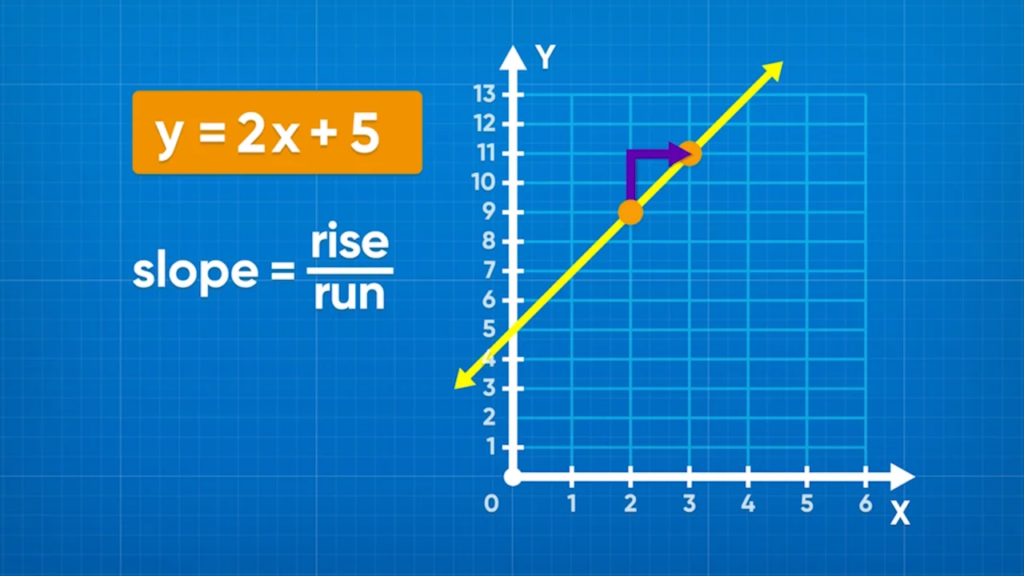
You will often hear slope described as “Rise over Run.”
- Rise: The change in the vertical direction (the y-axis).
- Run: The change in the horizontal direction (the x-axis).
If you have a line plotted on a Cartesian coordinate system (an x-y graph), you can determine its slope by picking any two distinct points on that line. Let’s call the first point $(x_1, y_1)$ and the second point $(x_2, y_2)$.
The standard mathematical formula for finding the slope (represented by the letter m) is:
$m = \frac{y_2 – y_1}{x_2 – x_1}$
The Four Types of Slope
Depending on the coordinates you use, your resulting slope will fall into one of four categories:
- Positive Slope: The line moves upward from left to right. Both the x and y values increase together. (e.g., $m = 2$)
- Negative Slope: The line moves downward from left to right. As x increases, y decreases. (e.g., $m = -0.5$)
- Zero Slope: The line is perfectly horizontal. There is no “rise,” meaning the numerator in our formula is zero. (e.g., $m = 0$)
- Undefined Slope: The line is perfectly vertical. There is no “run,” meaning the denominator in our formula is zero. Since dividing by zero is mathematically impossible, the slope is undefined.
Why Use a Slope Calculator?
While the formula $m = \frac{y_2 – y_1}{x_2 – x_1}$ seems straightforward, applying it manually can sometimes lead to simple arithmetic mistakes, especially when dealing with negative coordinates, fractions, or large decimals.
Here are the primary benefits of using a dedicated digital tool:
- Instant Accuracy: A calculator eliminates the risk of human error in addition and subtraction, which is incredibly common when subtracting negative numbers (e.g., $3 – (-4)$).
- Time Efficiency: If you have a homework assignment with 30 problems, or a data set requiring multiple slope calculations, a digital tool drastically reduces the time spent on repetitive arithmetic.
- Educational Feedback: The best calculators don’t just spit out a final number; they often provide the simplified fraction, the decimal format, and the resulting linear equations (like the Slope-Intercept form).
- Real-World Application: Professionals who need to calculate the pitch of a roof or the grade of a road need immediate, precise answers without pulling out scratch paper.
For a reliable, user-friendly, and accurate experience, we highly recommend bookmarking and using the tool at https://edufigure.com/slope-calculator/.
Step-by-Step Guide: How to Use the Slope Calculator
Using the Edufigure Slope Calculator is an intuitive process. Here is a detailed walkthrough of how to use it effectively.
Step 1: Identify Your Coordinates
Before you open the calculator, you need your data points. You must have the Cartesian coordinates for two points on your line.
- Point 1: $(x_1, y_1)$
- Point 2: $(x_2, y_2)$
Example: Let’s say you are looking at a graph, and your line passes through the points (4, 2) and (-3, 16).
Step 2: Input the First Point (Point A)
Navigate to the calculator. You will see input fields designated for the first coordinate.
- Locate the field for $X_1$ and type in 4.
- Locate the field for $Y_1$ and type in 2.
Crucial Tip: Double-check your signs. If your coordinate is negative, make sure to include the minus sign. Missing a negative sign is the number one cause of incorrect slope calculations.
Step 3: Input the Second Point (Point B)
Next, move to the input fields for the second coordinate.
- Locate the field for $X_2$ and type in -3.
- Locate the field for $Y_2$ and type in 16.
Step 4: Execute the Calculation
Once all four numbers are entered correctly, hit the “Calculate” (or equivalent) button. The tool will instantly process the formula: $\frac{16 – 2}{-3 – 4}$.
Step 5: Interpret the Results
A high-quality calculator will give you more than just a single number. Here is what you should look for in the results:
- The Slope ($m$): In our example, the numerator is $14$ ($16 – 2$) and the denominator is $-7$ ($-3 – 4$). Therefore, $14 / -7 = -2$. The slope is -2.
- Decimal and Fraction Forms: Sometimes slopes are messy. If your slope is $1/3$, the calculator will likely show you $1/3$ as well as $0.333…$
- Distance Between Points: Many calculators use the Pythagorean theorem to tell you the exact distance between the two points you entered.
- Angle of Incline: This tells you the angle of the line relative to the x-axis, usually measured in degrees.
- The Equation of the Line: The best tools will take your slope and points and generate the Slope-Intercept Form ($y = mx + b$). For our example, the calculator would reveal that the equation of the line is $y = -2x + 10$.
Moving Beyond the Basics: Linear Equations
One of the greatest advantages of using a comprehensive tool like the one at https://edufigure.com/slope-calculator/ is that it bridges the gap between a simple slope number and a full linear equation.
Once you have the slope ($m$), you can describe the entire line using various mathematical formats:
1. Slope-Intercept Form ($y = mx + b$)
This is the most famous and useful form of a linear equation.
- m = the slope you just calculated.
- b = the y-intercept (the exact point where the line crosses the vertical y-axis).
By knowing the slope and one point, the calculator automatically solves for $b$. This equation allows you to predict any $y$ value if you are given an $x$ value, making it the foundation of basic forecasting and algebra.
2. Point-Slope Form ($y – y_1 = m(x – x_1)$)
This format is often required by algebra teachers because it directly uses the slope and one of the points you already have. You simply plug the $m$, $x_1$, and $y_1$ directly into the formula. The calculator will often output this format to help you check your homework steps.
3. Standard Form ($Ax + By = C$)
In this format, $A$, $B$, and $C$ are integers (whole numbers, no fractions), and $A$ should ideally be positive. It is highly useful for solving systems of equations. Good calculators will convert your slope-intercept equation into standard form automatically.
Real-World Applications of Slope
You might be asking, “When will I ever use this outside of a math classroom?” The truth is, the concept of slope is everywhere in the physical and economic world.
Construction and Architecture
Builders use slope every single day, though they often refer to it as “pitch” or “grade.”
- Roofs: A roof’s pitch determines what materials can be used and how well it will shed water or snow. A “4/12 pitch” means the roof rises 4 inches for every 12 inches of horizontal run.
- Stairs: Building codes strictly regulate the slope of staircases (the ratio of the riser to the tread) to ensure they are safe to climb.
- Wheelchair Ramps: The Americans with Disabilities Act (ADA) mandates that a commercial wheelchair ramp must have a maximum slope of 1:12 (one inch of rise for every 12 inches of run).
Civil Engineering and Topography
When civil engineers design roads, they must calculate the grade (slope) of the terrain to ensure vehicles can safely travel. A road with a 10% grade is incredibly steep and requires warning signs for trucks. Topographical maps use contour lines to represent slope; lines clustered close together indicate a very steep slope (like a cliff), while lines spread far apart indicate a gentle, flat plain.
Economics and Business
In business, slope represents the rate of change. If you plot a company’s production volume on the x-axis and their total cost on the y-axis, the slope of that line represents the marginal cost—the cost to produce one additional unit of a product. Understanding this slope is critical for maximizing profit and setting prices.
Healthcare
Even in medicine, slope plays a role. When monitoring a patient’s vital signs over time, or tracking the dosage of a medication in the bloodstream (pharmacokinetics), medical professionals analyze the slope of the data on a graph to determine if a patient’s condition is improving or deteriorating rapidly.
Common Mistakes to Avoid
Even with a calculator, garbage in equals garbage out. Here are the most common pitfalls to avoid when calculating slope:
- Reversing the Formula: Remembering “Rise over Run” is vital. If you put the x-values on top ($\frac{x_2 – x_1}{y_2 – y_1}$), your answer will be completely wrong. It is always the change in y divided by the change in x.
- Inconsistent Ordering: The formula is $\frac{y_2 – y_1}{x_2 – x_1}$. If you subtract $y_1$ from $y_2$ on the top, you must subtract $x_1$ from $x_2$ on the bottom. If you mix the order (e.g., $\frac{y_2 – y_1}{x_1 – x_2}$), your slope will have the wrong sign.
- Mishandling Negatives: As mentioned earlier, if $y_1$ is $-5$, and $y_2$ is $10$, the numerator is $10 – (-5)$, which equals $15$. Many students mistakenly write $10 – 5 = 5$. Using a digital calculator prevents this, provided you type the negative sign into the input box!
Conclusion
Slope is a foundational concept that unlocks the doors to advanced mathematics, physics, engineering, and data analysis. While understanding the mechanics of “Rise over Run” is an essential mental exercise, leveraging modern tools makes applying this math faster and infinitely more reliable.
Whether you are plotting the trajectory of a physics experiment, designing a safe wheelchair ramp, or simply trying to ace your next algebra exam, taking advantage of digital resources is the smart way to work.
By utilizing the Edufigure Slope Calculator, you ensure accurate results, gain access to multiple equation formats, and save yourself from the frustration of lost negative signs and arithmetic errors. Gather your coordinates, plug them in, and let the calculator do the heavy lifting!